Reservation Settings
Reservation Settings
The Reservation Settings allow restaurant administrators to configure how table reservations work in the system. These settings help manage booking availability, reservation rules, and customer booking options to ensure smooth restaurant operations.
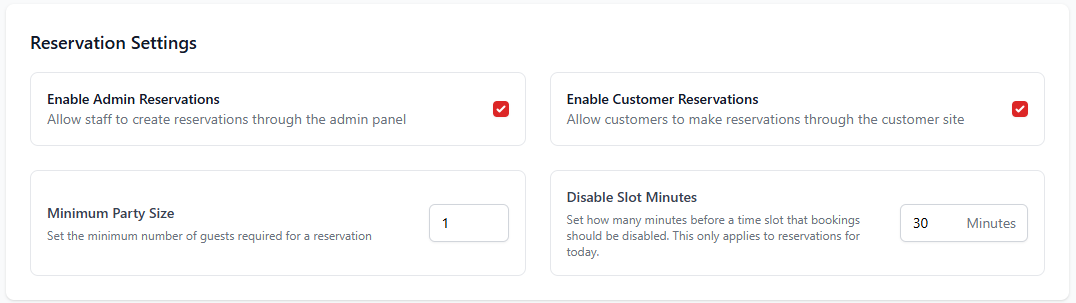
1. Enable Admin Reservations
This option allows staff members to create reservations directly from the admin panel. It is useful when reservations are made through phone calls or walk-in customers.
| Setting | Description |
|---|---|
| Enable Admin Reservations | Allows staff members to manually create reservations from the system dashboard. |
| Enable Customer Reservations | Allows customers to book tables directly from the customer website. |
| Minimum Party Size | Defines the minimum number of guests required to make a reservation. |
| Disable Slot Minutes | Defines how many minutes before a reservation slot becomes unavailable for booking. |
2. Time Slots Settings
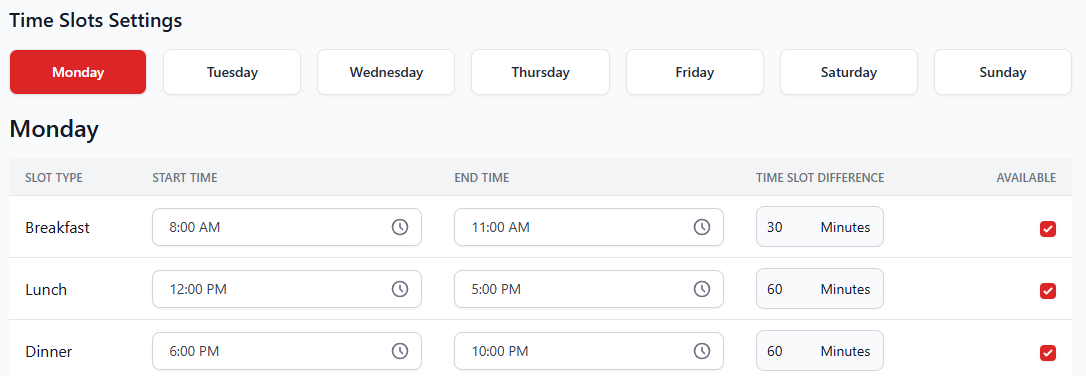
Time Slots Settings define the available reservation periods during the day. Restaurants can divide the day into different service periods such as breakfast, lunch, and dinner to manage bookings more efficiently.
| Slot Type | Description |
|---|---|
| Breakfast | Defines reservation availability for morning dining hours. |
| Lunch | Controls reservation timing during the lunch service. |
| Dinner | Defines reservation availability for evening dining hours. |
3. Understanding Time Slot Configuration
| Field | Description |
|---|---|
| Start Time | The time when reservations for the slot begin. |
| End Time | The time when reservations for the slot end. |
| Time Slot Difference | The interval between reservation slots (for example every 30 or 60 minutes). |
| Available | Enables or disables reservations for that time slot. |
Best Practices
- Enable customer reservations to allow online table bookings.
- Set appropriate time slot intervals to avoid overcrowding.
- Use minimum party size to control small bookings during busy hours.
- Disable slots close to the reservation time to allow kitchen preparation.