Expenses Dashboard
Expenses Dashboard
The Expenses Dashboard helps restaurant owners monitor, track, and manage all business expenses from a single centralized interface. It provides complete financial visibility including expense categories, payment status, due tracking, and spending analysis.
1. Expenses Overview
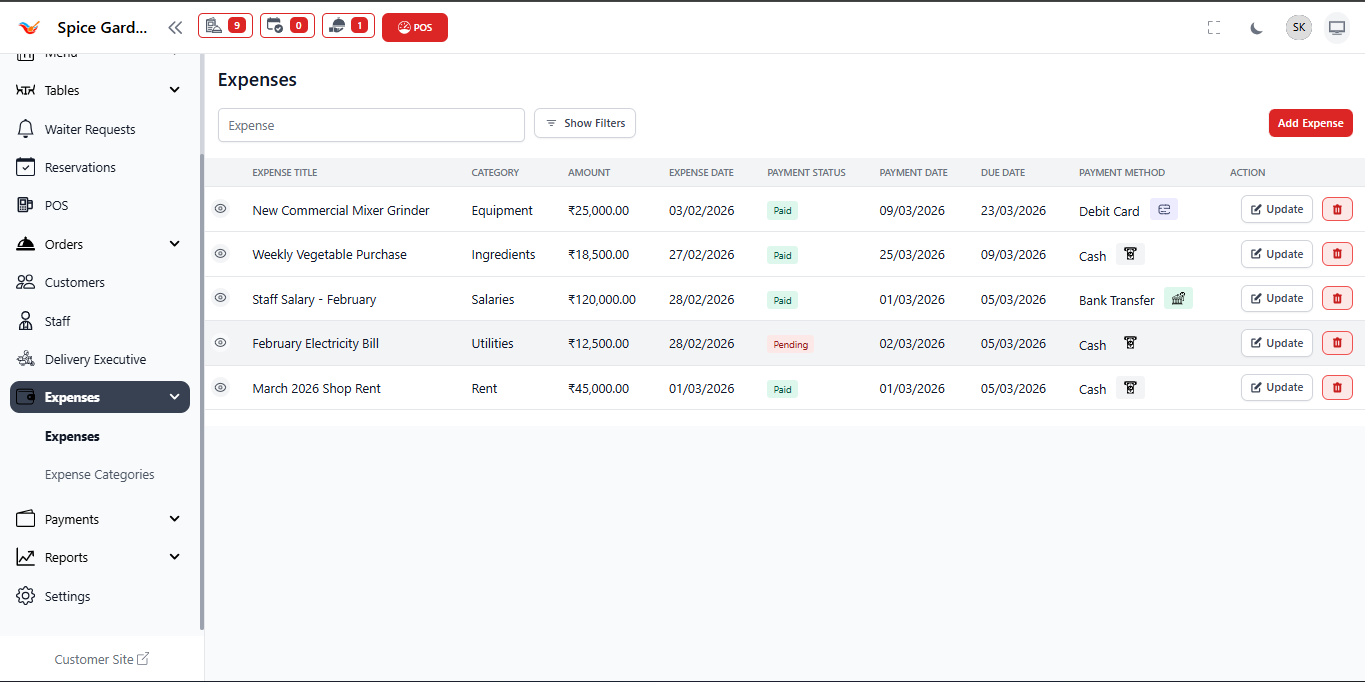
The Expenses Dashboard displays all recorded expenses in a structured table format. Each row represents one business expense entry along with financial and payment details.
- Expense Title – Name or description of the expense.
- Category – Type of expense (Rent, Utilities, Salaries, Ingredients, etc.).
- Amount – Total cost recorded for the expense.
- Expense Date – Date when the expense occurred.
- Payment Status – Indicates whether the payment is Paid or Pending.
- Payment Date – Date when payment was completed.
- Due Date – Deadline for pending payments.
- Payment Method – Mode of payment such as Cash, Card, or Bank Transfer.
2. Search and Filters
The dashboard provides quick filtering tools to locate expenses efficiently.
- Search expenses using keywords or titles.
- Use Show Filters to refine expense results.
- Filter by category, payment status, or date range.
3. Add Expense Button
The Add Expense button located at the top-right corner allows users to record new operational expenses instantly.
- Click the button to open the expense creation form.
- Enter expense details including amount and category.
- Attach receipt files for accounting records.
- Save to add the expense into the system.
4. Payment Status Indicators
Payment labels visually indicate the financial state of each expense.
- Paid — Expense has been successfully settled.
- Pending — Payment is still due.
5. Expense Actions
Each expense entry provides quick action buttons for management:
- Update — Modify expense details.
- Delete — Remove incorrect or duplicate entries.
These controls allow owners to maintain accurate financial records.
Why the Expenses Dashboard is Important
- Tracks operational spending in real time.
- Helps control unnecessary expenses.
- Improves financial transparency.
- Supports accounting and auditing processes.
- Provides clear visibility of pending payments.