Payment Settings
Payment Settings
Payment Settings allow administrators to configure payment gateways used to process customer transactions. These settings enable restaurants to accept online payments securely through supported payment providers.
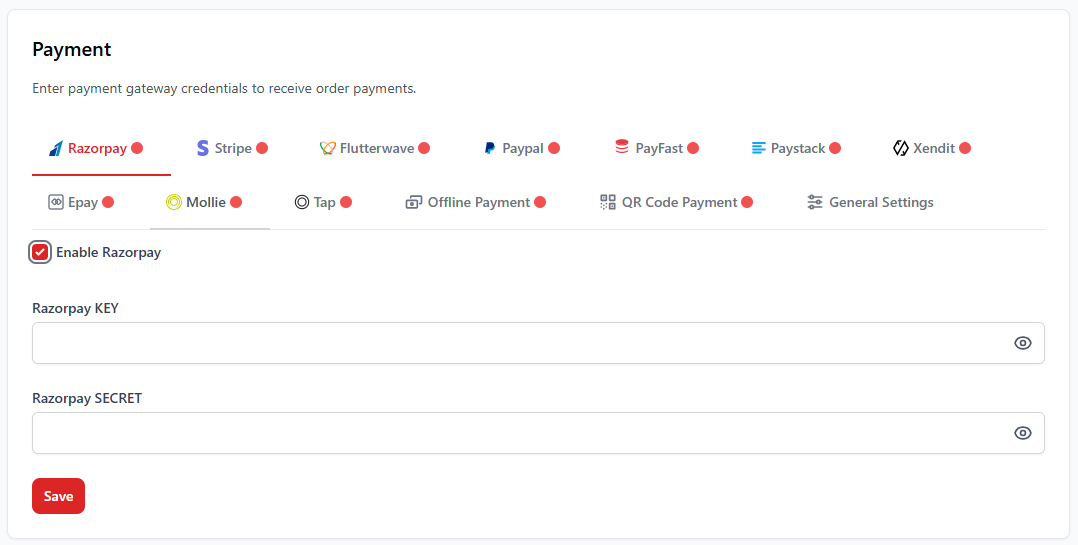
1. What are Payment Settings?
Payment Settings allow restaurants to configure payment gateways for processing digital transactions. By integrating payment providers, customers can complete payments using cards, UPI, wallets, or other online methods.
- Accept secure online payments
- Support multiple payment providers
- Enable faster order processing
- Provide flexible payment options for customers
2. Supported Payment Gateways
The system supports multiple payment gateways that can be enabled depending on your business requirements.
| Gateway | Supported Usage |
|---|---|
| Stripe | International online card payments |
| Razorpay | UPI, cards, wallets & Indian payments |
| PayPal | Global online payment platform |
| Flutterwave | African payment gateway for digital transactions |
| Paystack | Online payments in African regions |
| Xendit | Digital payment gateway for Southeast Asia |
3. How to Configure a Payment Gateway
- Navigate to Settings → Payment.
- Select the payment gateway you want to configure.
- Enable the gateway using the toggle option.
- Enter the required API credentials such as Key and Secret.
- Click Save to apply the configuration.
4. Offline Payment Options
Apart from online gateways, the POS system also supports offline payment methods used in restaurants.
- Cash payments
- UPI payments
- Bank transfer
- QR code payments
5. Important Notes
Payment gateways require valid API credentials provided by the
payment provider. Make sure the credentials are correct before
enabling the gateway.
For restaurants operating in India, Razorpay is commonly used
because it supports UPI, cards, wallets, and other local payment
methods.