Due Payments
How to Manage Due Payments
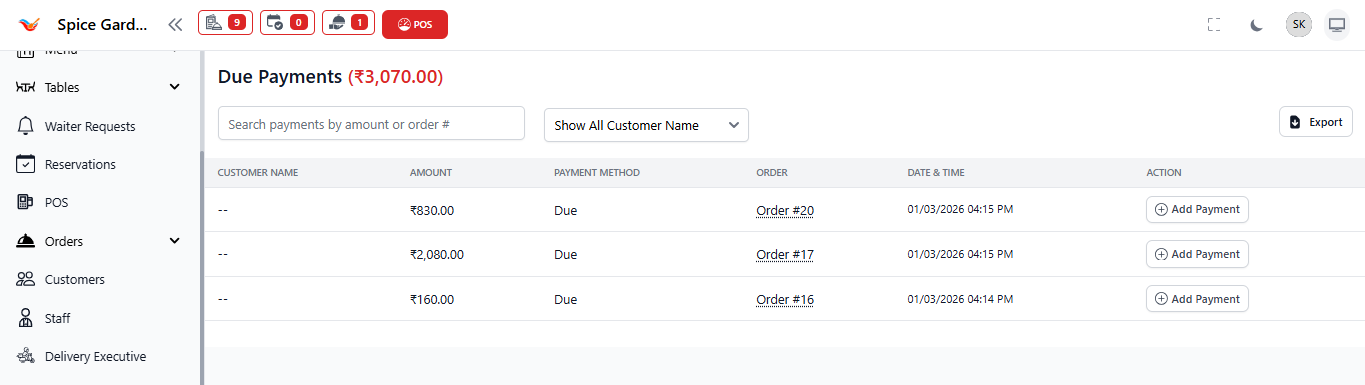
The Due Payments section helps restaurant owners track and manage all unpaid or partially paid orders. It ensures outstanding amounts are collected on time and revenue leakage is avoided.
1. What is a Due Payment?
A due payment is created when:
- An order is billed but payment is not completed.
- Customer pays partially.
- Credit facility is provided to regular customers.
Due payments directly affect your cash flow and must be monitored daily.
2. Information Displayed in Due Payments
- Customer Name – Linked to the unpaid order.
- Amount – Pending payment amount.
- Payment Method – Marked as "Due".
- Order Reference – Clickable order number.
- Date & Time – When the order was created.
- Add Payment – Button to record received payment.
3. How to Collect Due Payment
- Navigate to Payments → Due Payments.
- Locate the pending order.
- Click Add Payment.
- Select payment method (Cash / UPI / Card).
- Enter the received amount.
- Click Save to confirm payment.
Once full payment is completed, the entry will automatically move to the main Payments Dashboard.
4. Best Practices for Owners
- Review due payments at the end of every business day.
- Set clear credit rules for regular customers.
- Avoid long-term outstanding dues.
- Use export option for accounting tracking.
5. Financial Impact
- Due payments are recorded but not counted as collected revenue.
- Cash flow improves only after payment is received.
- Reports automatically update once payment is completed.