Cancelled Order Report
Cancelled Order Report
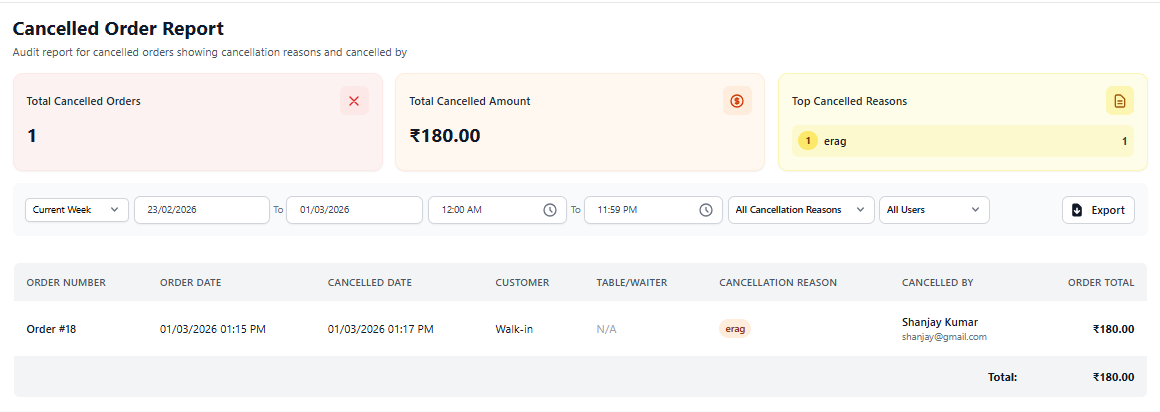
The Cancelled Order Report provides detailed information about orders that were cancelled during restaurant operations. This report helps owners monitor cancellation patterns, identify operational issues, and prevent revenue loss.
1. Purpose of Cancelled Order Report
This report tracks all cancelled orders along with cancellation details. It allows restaurant management to understand why orders are cancelled and which staff members performed the cancellation.
High cancellation rates may indicate operational inefficiencies or service issues.
2. Date & Filter Options
- Select predefined date ranges (Today, Week, Custom).
- Choose start and end dates.
- Filter cancellations by system user.
- Export report for management review.
Regularly analyze cancellations to improve customer satisfaction.
3. Cancelled Order Details
The report table includes the following information:
- Order Number – Unique order reference.
- Customer Name – Linked customer record.
- Order Amount – Value of the cancelled order.
- Cancelled By – Staff member responsible.
- Cancellation Reason – Explanation provided during cancellation.
- Date & Time – Timestamp of cancellation.
This helps maintain accountability and operational transparency.
4. Business Insights You Can Gain
- Identify frequent cancellation reasons.
- Detect staff training gaps.
- Measure potential revenue loss.
- Improve kitchen and service workflow.
- Enhance customer experience.
5. Best Practice for Owners
- Review cancelled orders daily.
- Investigate repeated cancellation patterns.
- Train staff to reduce order errors.
- Monitor high-value cancelled orders carefully.