Removed KOT Item Report
Removed KOT Item Report
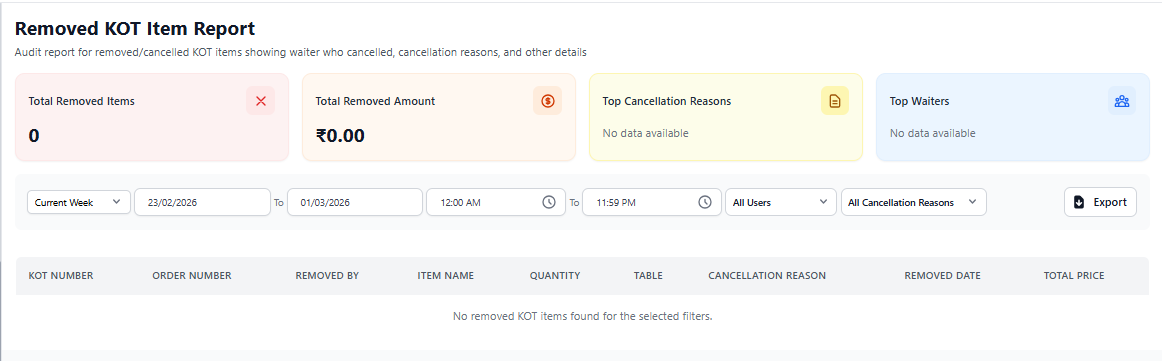
The Removed KOT Item Report tracks all items that were removed after being sent to the kitchen (KOT – Kitchen Order Ticket). This report ensures operational accountability and prevents misuse or unauthorized item removal.
1. Purpose of Removed KOT Item Report
This report records instances where items were deleted from an order after being confirmed and sent to the kitchen. It helps maintain control over inventory and staff actions.
Removing KOT items affects food cost and operational efficiency.
2. Date & Filter Options
- Select predefined date ranges (Today, Week, Custom).
- Choose start and end dates.
- Filter by specific staff members.
- Export report for management analysis.
Use filters to monitor high-volume removal periods.
3. Removed Item Details
The report table includes the following information:
- Order Number – Reference order ID.
- Item Name – Name of the removed menu item.
- Quantity Removed – Number of units deleted.
- Removed By – Staff member responsible.
- Reason – Explanation provided during removal.
- Date & Time – Timestamp of removal.
This ensures full visibility into kitchen workflow modifications.
4. Business Insights You Can Gain
- Monitor food wastage trends.
- Identify recurring order errors.
- Prevent unauthorized item deletion.
- Improve staff accountability.
- Reduce operational losses.
5. Best Practice for Owners
- Review removed KOT items daily.
- Investigate frequent removal reasons.
- Train staff to confirm orders before sending to kitchen.
- Monitor high-value item removals closely.