App Configuration
App Settings
The App Settings section allows administrators to configure the overall behavior of the POS system. These settings control how the application operates, system preferences, and platform-level configurations that affect the entire restaurant management system.
1. What are App Settings?
App Settings manage the internal configuration of the POS platform. These settings help administrators control system functionality, interface behavior, and platform operations that affect both staff and customer interactions.
- Configure system behavior
- Manage application preferences
- Control feature availability
- Customize platform functionality
- Improve operational efficiency
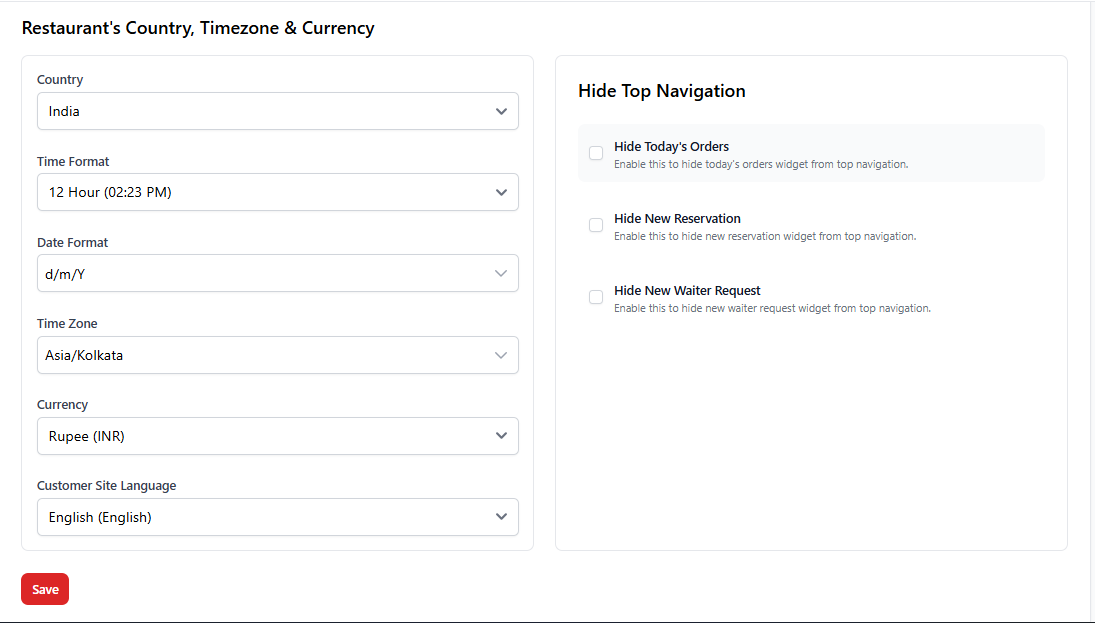
2. Common App Configuration Options
Depending on the system setup, the App Settings module may include several configuration options that affect system-wide operations.
| Setting | Description |
|---|---|
| Application Name | Defines the system or application name displayed across the platform. |
| Timezone | Sets the timezone used for orders, reports, and transactions. |
| Date Format | Defines how dates appear across the system. |
| Time Format | Allows switching between 12-hour and 24-hour time formats. |
| Language | Configures the default system language for the application. |
| System Notifications | Controls whether alerts and notifications are enabled. |
3. Why App Settings are Important
Proper configuration of App Settings ensures that the system works correctly for your restaurant’s operations and location.
| Benefit | Explanation |
|---|---|
| System Consistency | Ensures consistent formatting for time, dates, and transactions. |
| Better User Experience | Improves usability for staff by aligning the system with business needs. |
| Accurate Reporting | Correct timezone and formats ensure accurate reports and analytics. |
| Operational Efficiency | Proper settings reduce errors during order processing. |
4. Best Practices
- Configure the correct timezone before starting operations.
- Review system settings after installing the POS.
- Limit access to App Settings to administrators only.
- Regularly review settings after system updates.
- Ensure notification settings match your business workflow.
5. Important Notes
Changing App Settings can affect the entire POS system.
Only administrators or system owners should modify these configurations.
Always verify timezone, currency, and system preferences during initial setup
to avoid reporting and billing inconsistencies.