Email Notification
Email Settings
Email Settings allow administrators to configure automated email notifications sent by the POS system. These notifications help restaurants communicate important updates such as order confirmations, reservation alerts, and staff onboarding emails.
1. What are Email Settings?
Email Settings control which automated emails are sent to restaurant staff and customers during various system events.
- Notify staff when new orders are received
- Send reservation confirmations to customers
- Alert administrators about new reservations
- Email order bills to customers
- Send welcome emails to newly added staff members
2. Email Notification Options
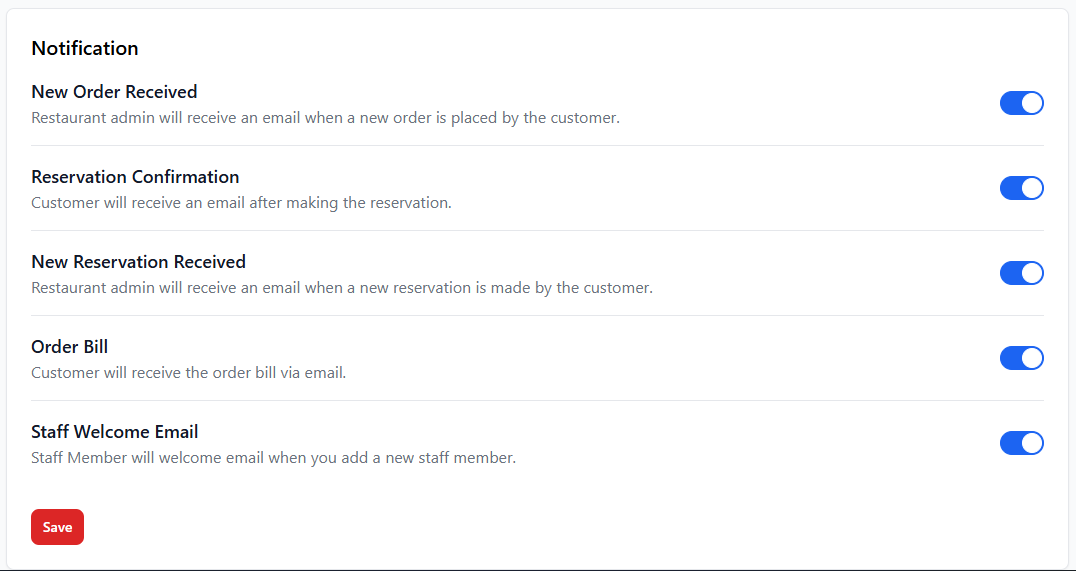
Each notification option can be enabled or disabled using the toggle switch.
| Notification Type | Description |
|---|---|
| New Order Received | Restaurant administrators receive an email whenever a new order is placed. |
| Reservation Confirmation | Customers receive an email confirmation after making a reservation. |
| New Reservation Received | Restaurant administrators receive an email when a new reservation is created. |
| Order Bill | The system sends the order bill to the customer's email. |
| Staff Welcome Email | New staff members receive a welcome email when they are added to the system. |
3. How to Enable or Disable Email Notifications
- Navigate to Settings → Email.
- Locate the notification option you want to modify.
- Toggle the switch ON to enable the notification.
- Toggle the switch OFF to disable the notification.
- Click the Save button to apply changes.
4. Best Practices
- Enable order notifications so staff can respond quickly to new orders.
- Use reservation confirmations to improve customer communication.
- Ensure the system email configuration is properly set up.
- Regularly test email notifications to confirm they are working.
5. Important Notes
Email notifications will only work if the email configuration of the system
is correctly set up. Ensure SMTP or email service settings are properly
configured by the administrator.
Automated emails help improve customer experience and reduce manual
communication tasks for restaurant staff.