Customer Header Customization
Customer Header Customization
Customer Header Customization allows administrators to control the appearance and elements displayed in the header section of the customer-facing website. This feature helps restaurants highlight important navigation options, branding elements, and customer interaction tools.
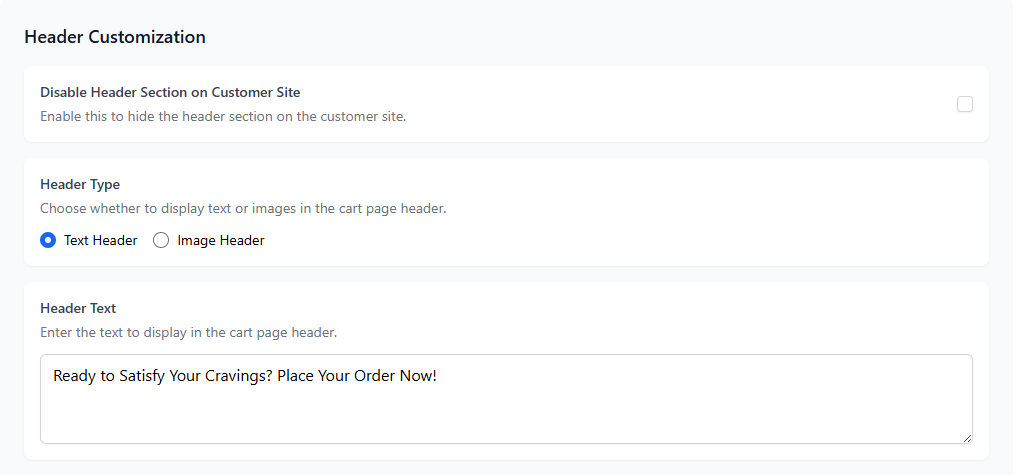
1. What is Customer Header Customization?
The header is the top navigation area of the customer site where customers can access important features such as menu navigation, reservations, orders, or contact information. Through header customization settings, administrators can enable or disable specific elements to improve the customer experience.
2. Available Customization Options
| Header Option | Description |
|---|---|
| Logo Display | Shows the restaurant logo in the customer site header for branding. |
| Navigation Menu | Displays main navigation links such as Menu, Reservations, and Contact. |
| Reservation Button | Allows customers to quickly access the reservation page. |
| Order Now Button | Provides a quick access button for customers to place online orders. |
| Call Waiter Option | Displays a button allowing customers to request waiter assistance. |
| WiFi Icon | Displays the restaurant WiFi icon for quick customer access. |
3. Why Header Customization is Important
- Improves customer navigation on the restaurant website.
- Highlights important restaurant services such as ordering and reservations.
- Enhances branding and restaurant identity.
- Provides quick access to frequently used customer actions.
4. Best Practices
- Keep the header clean and avoid adding too many navigation options.
- Always include the menu and reservation links for quick access.
- Ensure branding elements like logo are clearly visible.
- Enable the order button for restaurants offering online ordering.